Solutions / RelatiQ ERD Designer

Developer Tools · v1.3.31 · Windows

RelatiQ ERD Designer

Draw your schema, get DDL, docs & code instantly — free for individuals.

RelatiQ ERD Designer

RelatiQ is an ERD design tool originally built by BEBOB Software for internal use — now refined and released for everyone.

01

Why RelatiQ

01

Stay in the flow — no interruptions

Add columns one after another with Tab and Enter, and draw relationships with just two clicks — parent to child. Your hands never leave the keyboard, so there's no back-and-forth with menus. You design at the speed of thought. The more tables you work through, the more that difference adds up.

02

Your diagram is your deliverable

Whatever you design on the canvas is instantly available as a DDL script, a live database, a table specification document (Excel/PDF), or class code in 11 languages. You can also go the other way — import an existing database and generate an ERD through reverse engineering.

03

Design alongside AI

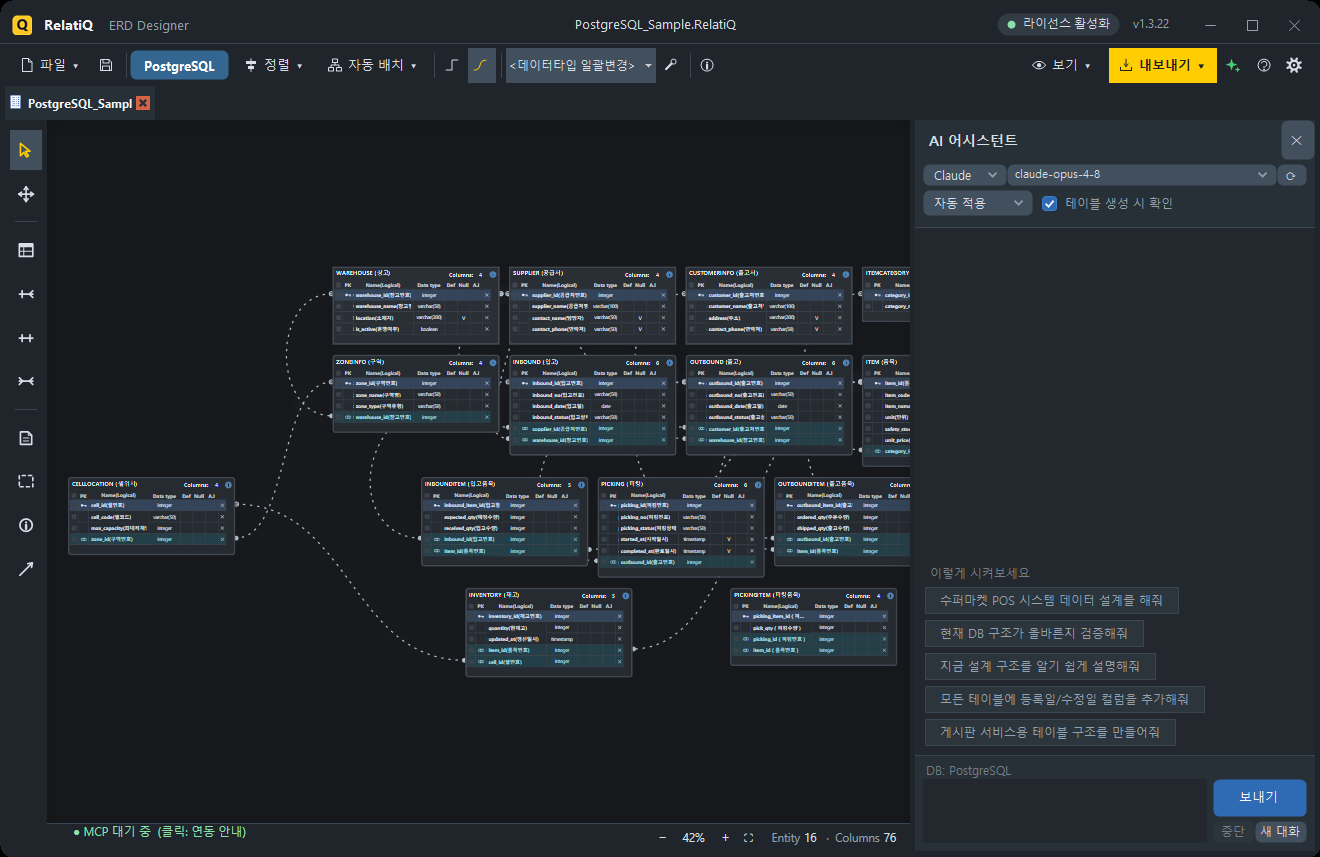
Say something like "Create member and order entities and connect them 1:N" — the built-in AI assistant draws it on the canvas right away. External AI tools like Claude Desktop and Cursor can connect to RelatiQ via MCP and do the same. Every AI-driven change can be undone with Ctrl+Z.

Built-in AI assistant panel
Speak naturally, see it on the canvas instantly — every change is undoable
02

Key Features

01

Visual ERD Editing

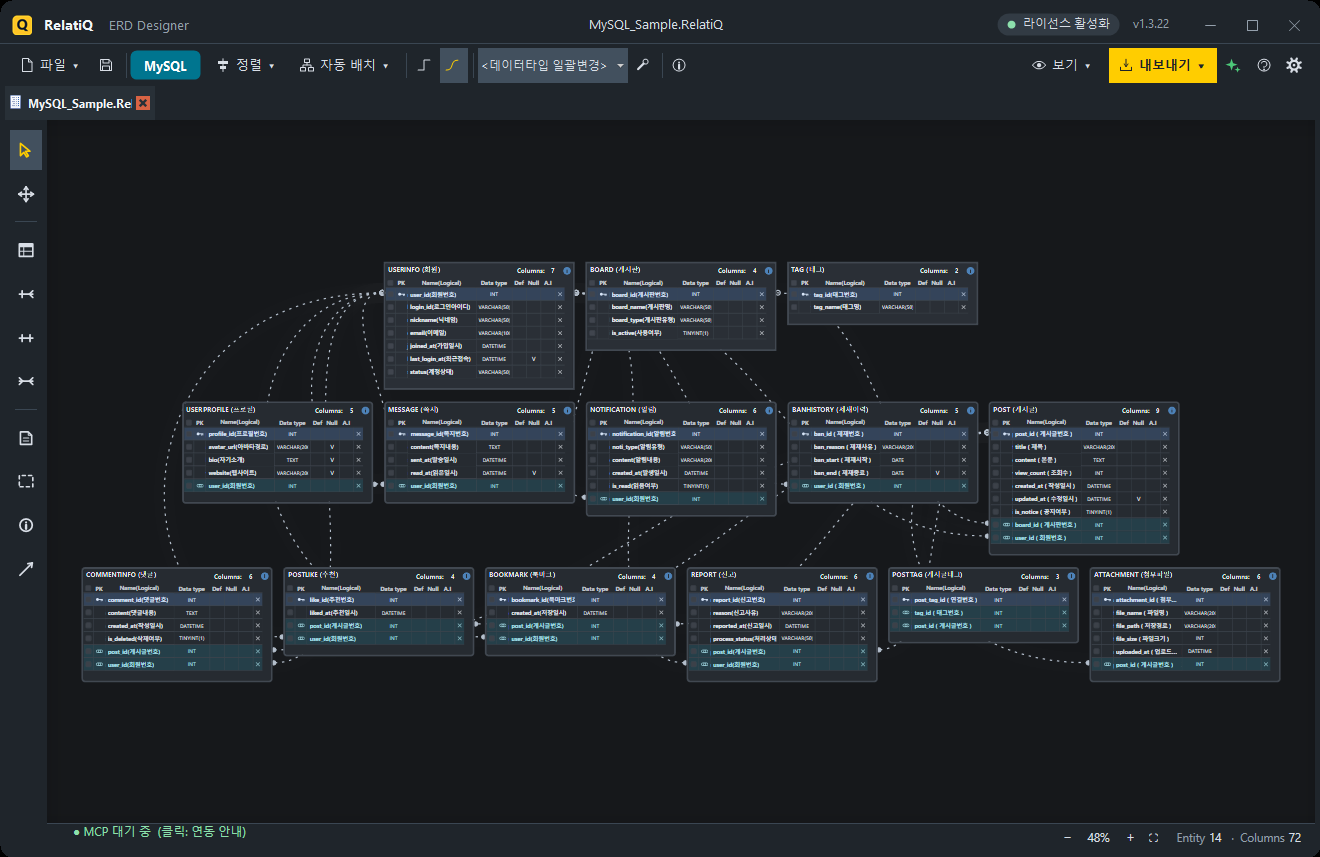
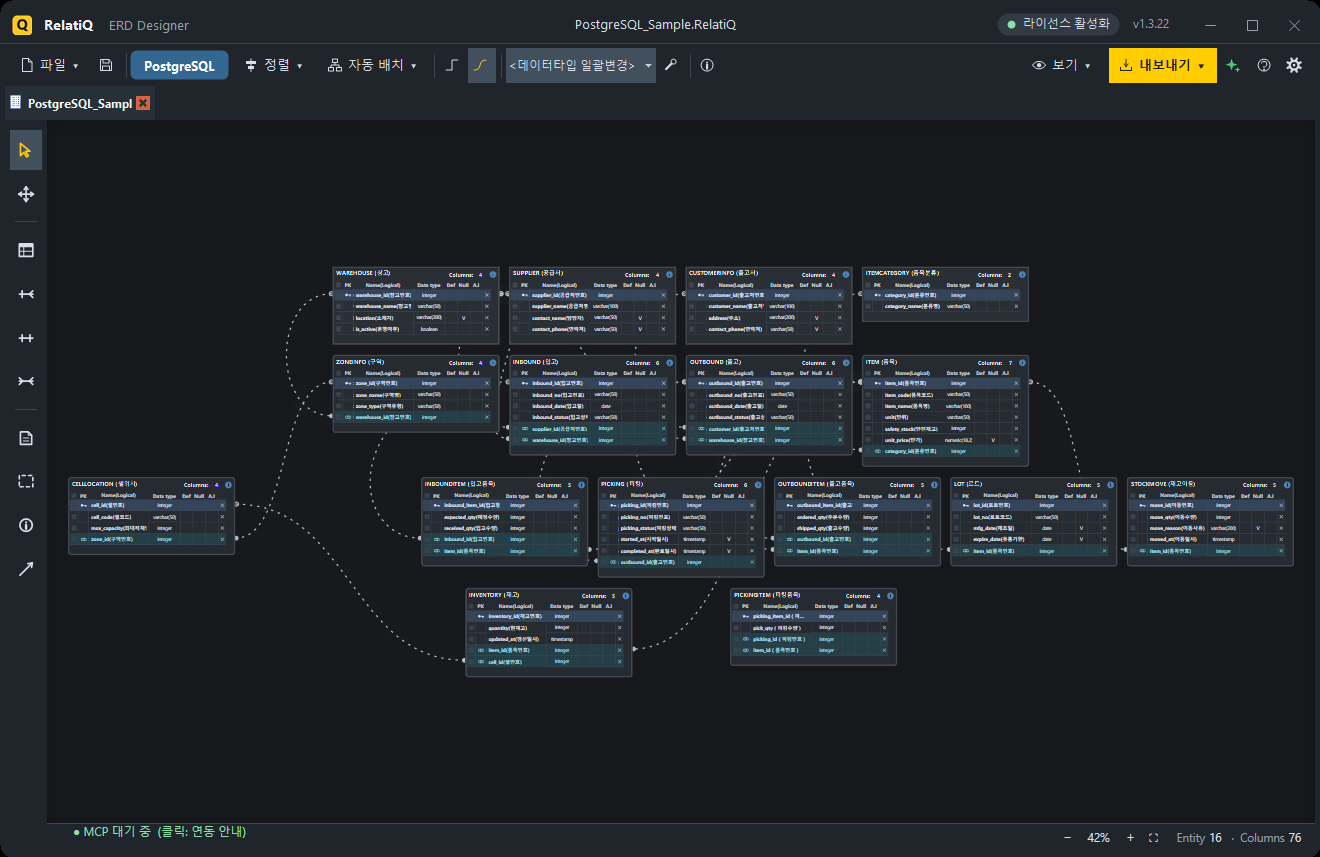
  • An infinite canvas with alignment and auto-layout (hierarchical and multi-root tree) keeps even complex schemas organized at a glance
  • Annotate your diagrams directly with notes, group boxes, project info stamps, and arrows
02

Relationship (FK) Modeling

  • Identifying (1:1) · Non-identifying (1:N) · Many-to-many (N:N)
  • Parent PKs automatically propagate to child FKs — update the parent and the child follows
  • Orthogonal or Bezier curve connectors, with 5 notation styles (Crow's Foot · IE · IDEF1X · Arrow · Minimal)
  • Select a relationship line to highlight only the connected PK–FK pair
03

Output & Exports

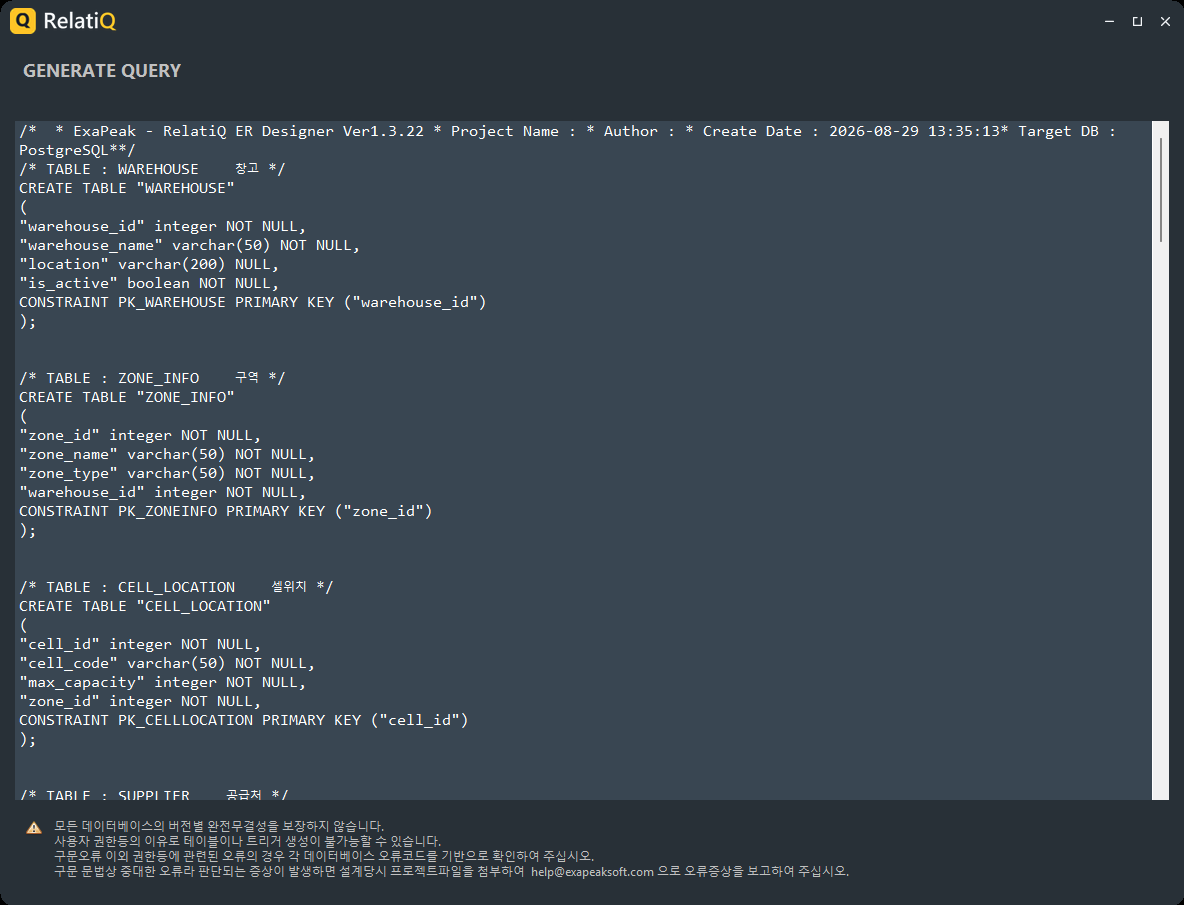
  • DDL Scripts — CREATE TABLE · PK · FK · comments, generated to match your target DB dialect (Ctrl+E)
  • Direct Database Creation — enter your connection details and execute everything in a single transaction
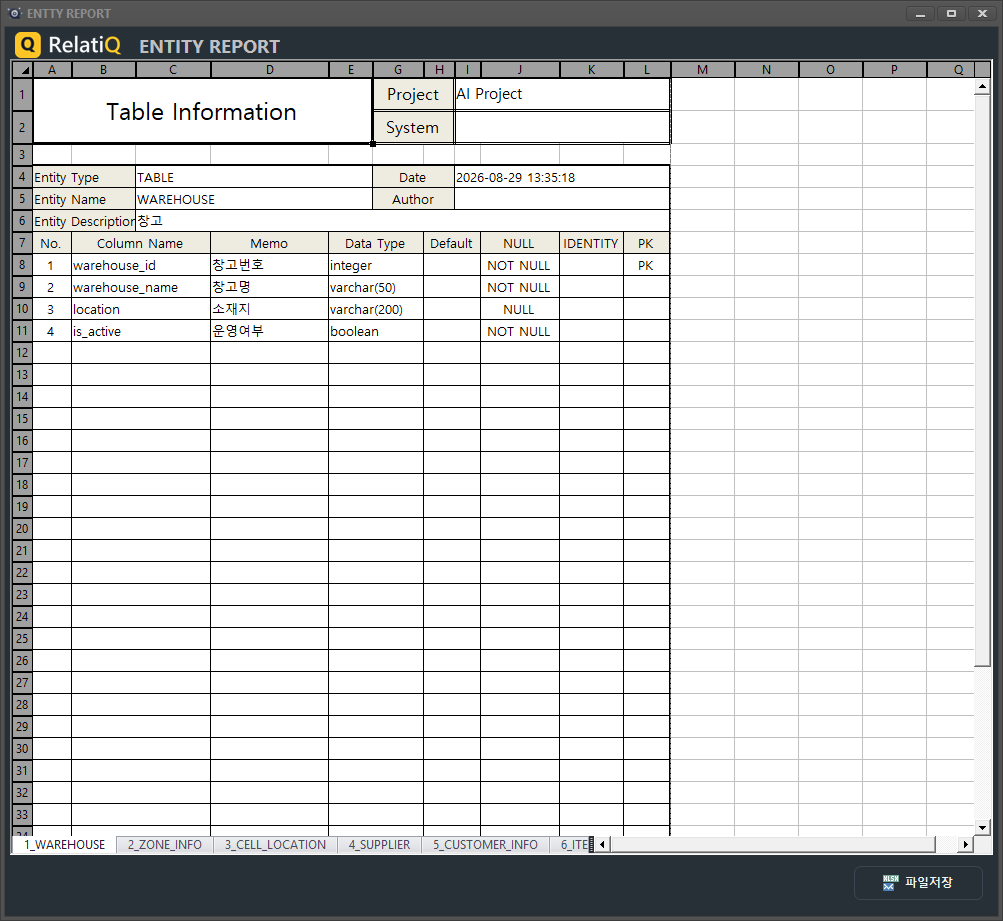
  • Table Specification Documents — full schema or per-entity, exported as Excel (xlsx) or PDF
  • Code Generation — classes for C# · Java · PHP · TypeScript · Python · C++ · Go · Kotlin · Swift · Dart · F#, plus JSON and XML
  • ERD Image — export as a cropped PNG with no extra whitespace
DDL generation window
Generate dialect-specific DDL from your design — right then and there
Table specification document preview
Export table specification documents as Excel or PDF — ready to submit
04

Reverse Engineering

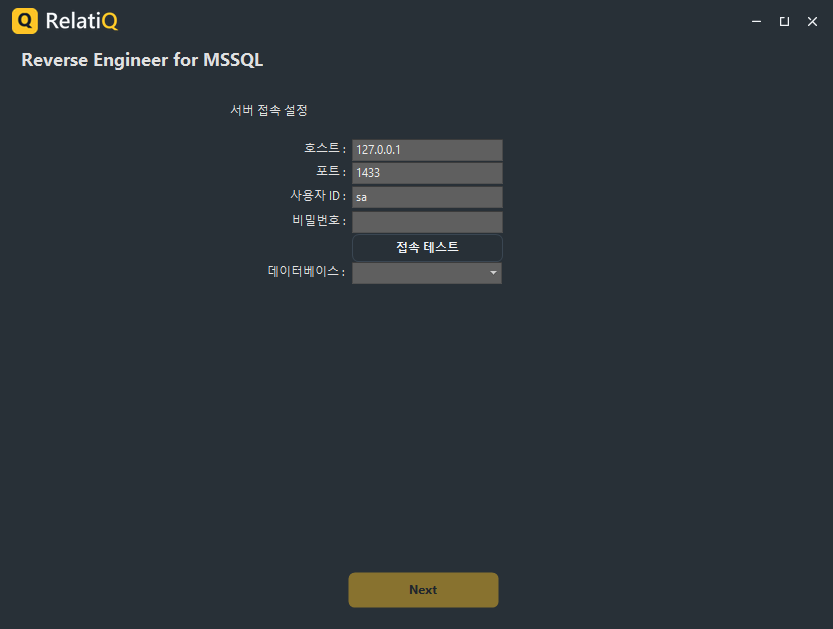
  • Import an existing SQL Server · MySQL · Oracle database into an ERD using a simple 3-step wizard
  • Brings in tables, columns, comments, PKs, and FKs — comments become logical names
Reverse engineering wizard
Turn an existing DB into an ERD — schema documentation made easy
05

AI Assistant & MCP Integration

  • Built-in AI panel (ChatGPT · Claude · Gemini): generate, modify, and review using natural language, with conversation memory and one-line prompts to draft an ERD
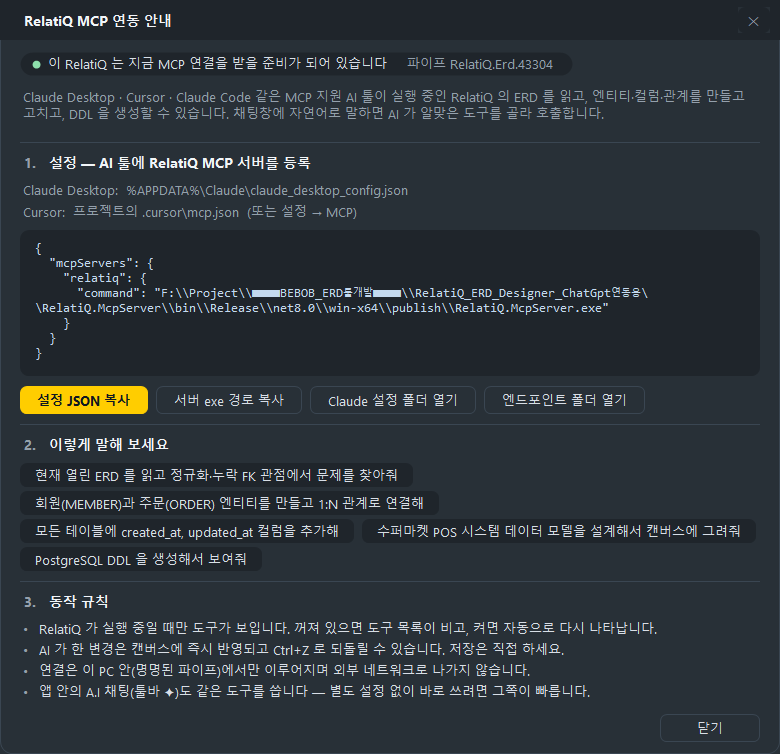
  • Built-in MCP server: Claude Desktop · Cursor · Claude Code can read and draw on your open ERD. Copy the setup JSON from inside the app — that's all it takes
  • Generate test data (INSERT statements)
  • All connections stay on this machine (named pipe) — nothing goes over the network
MCP integration guide window
Connect Claude Desktop or Cursor via MCP — setup takes a single copy-paste
06

Themes & Languages

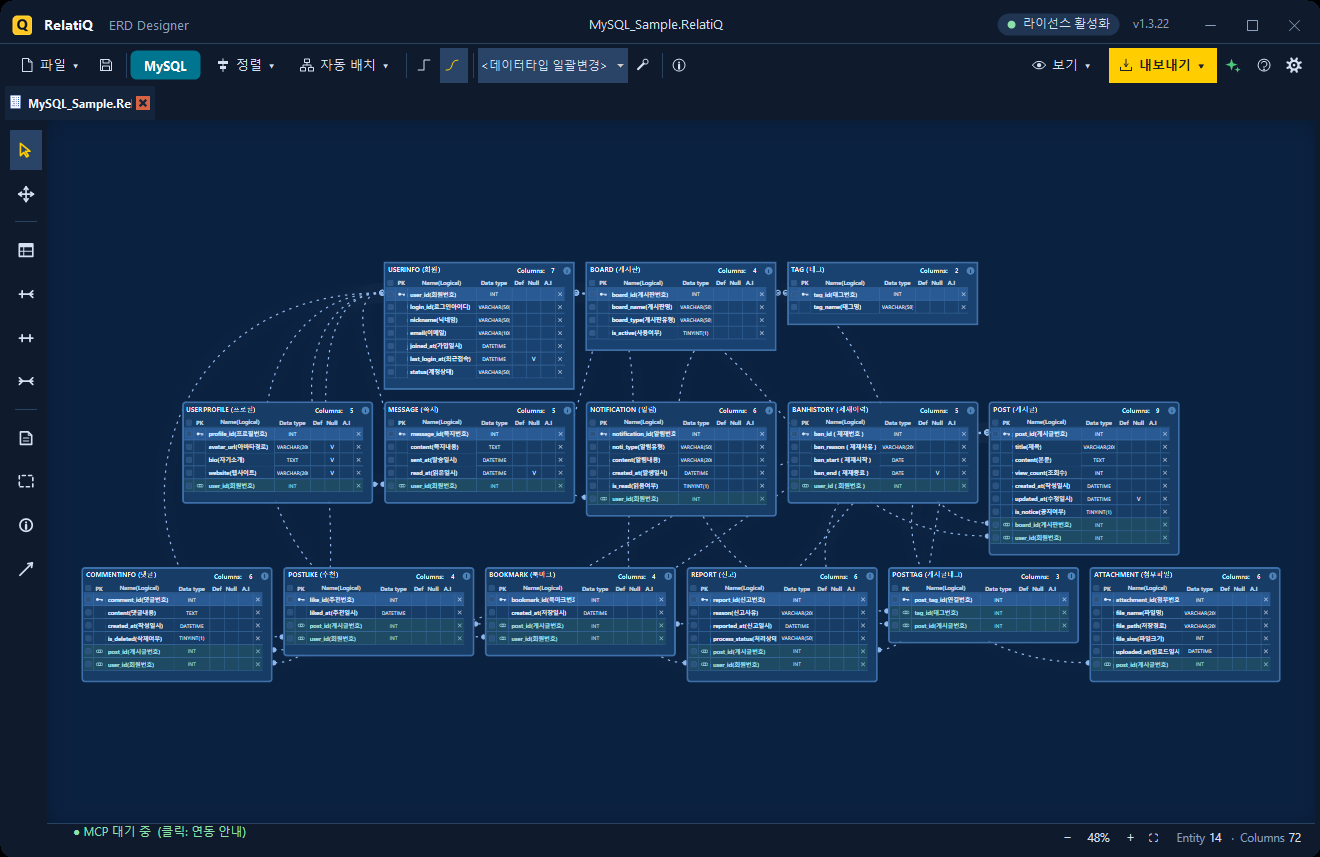
  • RelatiQ Dark / Light / Blueprint — the entire application window follows the theme, not just the canvas
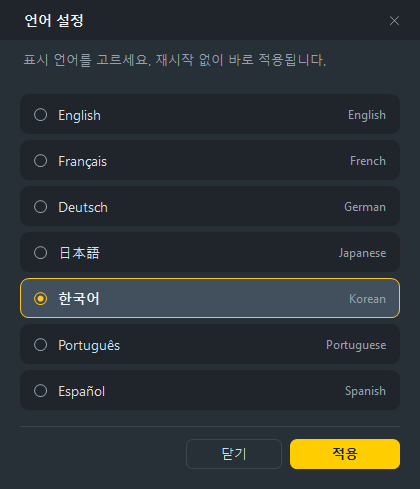
  • 7 languages — Korean · English · Japanese · German · French · Portuguese · Spanish, switchable instantly without restarting
  • The user manual is also available in all 7 languages (Help › User Manual)
Language selection (7 languages)
7 languages, switch instantly — no restart needed
03

Supported Databases

DBDesignDDLDirect CreationReverse
Microsoft SQL Server●●●●
MySQL●●●●
Oracle●●●●
PostgreSQL●●●–
MongoDB●JSON structure––
04

Who It's For

  • Developers — design your tables visually and walk away with DDL and entity classes at the same time
  • DBAs & Architects — document your current schema using spec sheets and reverse engineering
  • SI/SM Project Teams — produce and deliver design deliverables (spec PDFs/Excel) to clients
  • AI Tool Users — use Claude or Cursor to work with your schema and see the results visually
  • Students & Educators — learn relational modeling visually and verify it in SQL right away
05

Free for Individual Users

The free version has no feature restrictions. Entity count, DDL, reverse engineering, AI, and MCP are all fully available. The only difference is that outputs include a small attribution mark.

Free VersionPro License
Design · AI · MCP · Reverse EngineeringFull accessFull access
DDL ScriptOne-line comment at the topNo mark
Table Specification DocumentPDF (watermarked)Excel (xlsx) + watermark-free PDF
ERD ImageAttribution in the cornerNo mark

The Pro license is intended for business and institutional use. It includes Excel (XLSX) export for table specification documents and clean, watermark-free outputs. Please reach out for licensing inquiries.

Download it for free today and use it without limits.

06

Screenshots

Download Latest

Latest builds per OS

Latest version v1.3.31 Category Developer Tools Price ₩550,000 One-time purchase, lifetime use

Release Notes

Version history and downloads per OS.

View full changelog →

v1.3.31 Windows x64 LATEST
2026-10-04
  • Register a license directly with your order number (no order number? send an approval request)
  • View › Entity display (All · Logical only · Physical only · Except logical) works again
  • Settings, API keys and recent files are kept across updates; the display language follows Windows automatically
  • Licensed edition: save the table definition as a watermark-free PDF too
  • Undo (Ctrl+Z) now works after auto layout, relation-line cleanup and JSON paste
  • Smoother startup, more screens translated and stability improvements
v1.3.30 Windows x64
2026-09-30
  • New license process: copy your authentication code, then register by pasting the license you receive or opening the license file
  • Added anonymous usage statistics (can be turned off in Preferences)
v1.3.29 Windows x64
2026-09-28
  • Windows snap support — drag the window to the left, right or top edge of the screen
  • Maximize now stays on the current monitor in multi-monitor setups
  • Smoother splash screen without flickering
  • Less stutter when resizing or maximizing the window
v1.3.28 Windows x64
2026-08-30
  • The installer now displays in your PC's language (7 languages)
  • Unified screen styling and stability improvements
v1.3.27 Windows x64
2026-08-30
  • Unified remaining screens into the new dark theme
  • Improved project-tab usability
  • Fixed display-language and settings issues
v1.3.26 Windows x64
2026-08-29
  • Unified remaining screens into the new dark theme
  • Improved project-tab usability
  • Fixed display-language and settings issues
v1.3.25 Windows x64
2026-08-29
  • Automatic entity width to fit text length
  • Improved auto-layout (no overlap, fit to screen)
  • Child FK follows when the parent PK is renamed
  • Faster editing response
v1.3.15 Windows x64
2026-08-26
  • Free edition opened up — removed entity/object limits and limits on DDL generation and DB reverse engineering
  • Free edition outputs carry a Free Edition mark; Pro adds Excel export and watermark-free outputs
v1.3.14 Windows x64
2026-08-16
  • The update dialog now uses the app's dark theme
v1.3.13 Windows x64
2026-08-16
  • Infinite canvas (expands in all directions, drag to pan, fit-to-view)
  • Crisp rendering at any zoom level
  • Improved relationship lines (follow drag in real time, cardinality symbols)
  • Choose from 5 cardinality symbol styles (settings)
v1.3.12 Windows x64
2026-08-16
  • Stability improvements and bug fixes
v1.3.11 Windows x64
2026-08-16
  • Official AI integration (MCP) — AI tools like Claude and Cursor read and draw your ERD through conversation
  • Support for the latest AI models
  • Automatic updates now supported
  • Faster install and startup
v1.3.4 Windows x64

Send Feedback · Report a Bug

Tell us about any issues or features you would like for RelatiQ ERD Designer. It goes straight to the dev team.

Want it tailored to your work?

Use it as it is, or let us customize just the parts you need.

Adoption & Custom Inquiry → Buy