Solutions / photoKam

Utilities · v0.9.4 · Windows · macOS

photoKam — photoKam – Photo Management App for Windows & macOS

Hundreds of Thousands of Photos, Found and Culled Fast

Find and cull hundreds of thousands of photos in an instant — freeware photo manager for Windows & macOS, free for personal use

photoKam

Are hundreds of thousands of photos buried somewhere on an external hard drive? If File Explorer crawls and pro editing suites are too steep a learning curve — photoKam is exactly what you've been missing.

01

Why photoKam

01

Install, pick your folders, done

No sign-up, no login — just start using it. Point photoKam at the folders that hold your photos; the originals stay right where they are while it builds the index and thumbnails and shows everything in one gallery.

02

Handles hundreds of thousands of photos without breaking a sweat

Built-in file managers and viewers slow to a crawl as your library grows. photoKam uses high-speed proprietary indexing and a virtual-scroll gallery to load hundreds of thousands of photos instantly. Scroll through the gallery, change your search filters — the response is immediate, every time.

03

A lightweight, native app

Because it's native, the install footprint is small and memory and CPU usage stays low. It runs quietly in the background with no heavy runtimes or separate services required.

02

Key Features

01

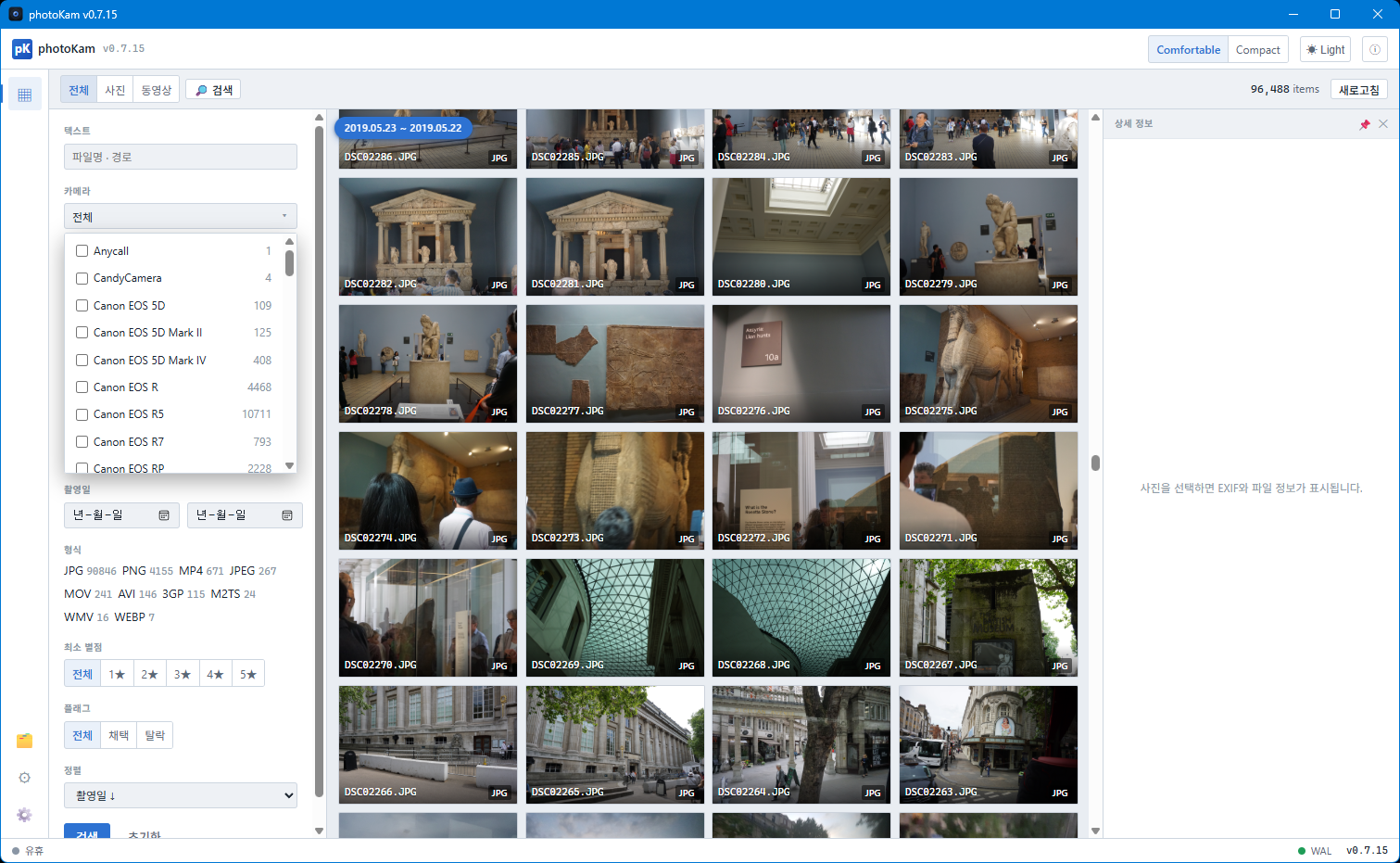
Find shots exactly as you remember them — Precision EXIF Search

Filter by whatever you recall: which camera, which lens, which settings.

  • Camera & lens multi-select
  • ISO, aperture, and focal length range filters
  • Date range, file extension, and filename combined search
  • Sort by capture date, filename, or star rating
  • Timeline view of the shooting period for currently displayed photos

Pulling only the night shots taken with a specific lens from thousands of images takes seconds.

02

Cull faster than ever — Star Ratings & Flags

Selecting the keepers is the most critical step in any photo workflow. photoKam is built around keyboard-first culling.

  • 0–5 star ratings and Pick/Reject flags
  • Rate quickly with keyboard shortcuts, filter instantly by rating
  • Multi-select with Ctrl, Shift, or drag — apply changes in one go
  • Deletes go to the OS Recycle Bin / Trash — mistakes are always recoverable
03

See every detail — Lightbox & Compare View

Open any photo from the gallery for smooth zoom and pan with a film-strip at the bottom.

  • Overexposure (clipping) zebra warning overlay for exposure review
  • Side-by-side compare view for 2–4 images (4 images in a 2×2 grid) with synchronized zoom and pan
  • Previous/next navigation with arrow-key support
  • Built-in video player — playback, scrubbing, volume, playback speed, and fullscreen, all included
04

Videos just play — Codecs built in

Tired of videos that won't open because of missing codecs? photoKam bundles the most common video codecs right inside the app. There's nothing extra for you to install.

  • MP4, MOV, WebM and other natively supported formats play immediately
  • Incompatible formats — AVI, M2TS, WMV, HEVC, 3GP and more — are automatically transcoded to a playback MP4 on the fly (cached for reuse)
  • Tricky formats like PCM-audio MOV files are handled without any extra fuss
05

Never touch the original — Lossless Rotation & External Editor Integration

  • Photo rotation: preserves EXIF data and targets lossless rotation applied directly to the original
  • Video rotation: corrects MP4, MOV, M4V, and 3GP files by rewriting the display matrix — no re-encoding
  • Open in external editor: hand off instantly to an image editor, a video editor, or your OS default app
  • Right-click to reveal the file's location in File Explorer or Finder
06

Never miss a file — Auto-Scan & Error Management

  • Incremental auto-scan on launch — files added or changed while the app was closed are picked up automatically
  • View the indexing error log, retry failed items only, or trigger a full rescan
  • Exclude folders to skip paths you don't need
  • Detailed EXIF and file-info panel with a pin option so data stays visible even when selection changes
07

Tailored to your setup — Settings

  • Dark/Light theme, UI density, and thumbnail size options
  • Gallery rendering load controls (pre-draw range and async decoding)
  • Indexing concurrency, prefetch range, and storage and cache location management
03

Who Is photoKam For?

SituationWhat photoKam solves
Tens of thousands of photos stored on a local drive or external hard driveAn indexed gallery that responds instantly instead of a sluggish file browser
You want to start right away, without sign-ups or setupInstall and pick folders — no account required
Photographers who need to cull by camera, lens, or settings quicklyPrecision EXIF search + star rating / flag workflow
Pro editing suites feel like overkill but File Explorer just isn't enoughThe practical choice that sits right in between
Videos that constantly fail to open due to codec issuesBuilt-in codecs with automatic transcoding playback
04

How is photoKam different from photoKam Radar?

Similar names, different jobs. photoKam is lightweight freeware focused on finding and culling photos fast. photoKam Radar adds RAW editing and AI retouching on top — a full photo manager and editor.

ItemphotoKamphotoKam Radar
What it doesFind and cull photosFind, cull and edit photos
Bringing in photosYou choose the photo foldersIndexes your whole computer and drives automatically — no folders to add
EditingLossless rotation · open in your own editorPro-grade RAW editing · AI skin retouch · 37 presets
DevicesWindows · macOSWindows · macOS · iPad · iPhone
CostFreeware — free for personal, non-commercial useFree version (all features, watermark on edits and exports) or licensed (no watermark)
05

System Requirements

  • Platforms: Windows · macOS (desktop install)
  • Images: JPEG, PNG, WebP, GIF, TIFF, and more
  • Video: MP4, MOV, M4V, WebM native playback + AVI, M2TS, WMV, MKV, 3GP auto-transcoded playback
06

Licensing & Pricing

photoKam is freeware. It is free for personal, non-commercial use. A separate license is required for business, institutional, or commercial use.

Download Latest

Latest builds per OS

Latest version v0.9.4 Category Utilities Freeware · free for personal use

Release Notes

Version history and downloads per OS.

View full changelog →

v0.9.4 Windows x64 LATEST
2026-11-05
  • • Fixed the horizon tilting when turning 360° videos (some 360 cameras)
  • • Fixed the close button being hidden in the 360° view
  • • Added buttons to snap the window to the left or right half of the screen
v0.9.3 Windows x64
2026-11-04
  • • Look around 360° photos and videos (drag to turn, zoom in and out)
  • • Open 360 camera originals (.insp, .insv) directly
  • • Fixed the Gallery freezing after adding a folder
  • • Hidden and system folders and cloud-only files are skipped
  • • Scanning starts as soon as you add a folder
v0.9.2 Windows x64
2026-11-03
  • • Browse by folder (folder tree beside the Gallery)
  • • Thumbnails where you scroll appear first
  • • Fixed no photos being found when adding a whole drive
  • • Scan progress shown for large folders
  • • Fixed scans failing when a folder and its subfolder were both added
v0.9.1 Windows x64
2026-11-01
  • • Now view-only (features that changed original files removed; rotation is on screen only)
  • • Better playback of 8K and high-bitrate videos; unplayable videos are converted automatically
  • • Three view modes (grid, justified tiles, list), jump to date, focus point display, external subtitles
  • • Settings split into tabs, with search
  • • Faster thumbnails, smaller database, bug fixes
  • • Program file renamed to photokamViewer.exe
v0.9.0 Windows x64
2026-08-30
  • • 6 languages (Korean, English, Japanese, French, German, Spanish), switch instantly in Settings
  • • Manual, installer and terms in 6 languages
v0.8.8 Windows x64
2026-07-05
v0.8.7 Windows x64
2026-06-30
v0.8.6 Windows x64
2026-06-30
  • Stabilization
v0.9.2 macOS (Apple Silicon) LATEST
2026-11-03
  • • 6 languages (한국어·English·日本語·Français·Deutsch·Español) — switch anytime in Settings.
  • • Refined as a pure viewer for photos and videos — rotation is applied on screen only; original files are never modified.
  • • High-resolution, high-bitrate videos play smoothly, and videos that would not play are converted automatically. External subtitles are attached automatically.
  • • Three view modes (grid, justified tiles, list), a jump-to-date calendar, and focus point display (F).
  • • Browse by folder — click a folder in the tree on the left of the gallery to see only its photos, or turn on "Include subfolders" to see everything below it.
  • • Visible first — if the spot you scroll to has no thumbnails yet, those photos are made first.
  • • RAW and large JPEG thumbnails are much faster.
  • • RAW+JPG pair settings use a new format and return to the defaults (pairs grouped, JPG shown).
  • • Fixed several issues, including video capture times being off.
v0.8.7 macOS (Apple Silicon)
2026-07-05
v0.8.6 macOS (Apple Silicon)
2026-07-05
v0.7.86 macOS (Apple Silicon)
2026-06-30
  • Stabilization
v0.7.85 macOS (Apple Silicon)
2026-06-30

Send Feedback · Report a Bug

Tell us about any issues or features you would like for photoKam. It goes straight to the dev team.

Want it tailored to your work?

Use it as it is, or let us customize just the parts you need.

Adoption & Custom Inquiry →